
Wallet: Budget Expense Tracker
BudgetBakersFinance
4.67.52K Reviews
- Version
- 9.3.6
- Installs
- 10.00M
- Age Rating
- Everyone
Screenshots
Our Review of Wallet: Budget Expense Tracker
 Analysis by Appyee
I like a money app best when it helps me answer a practical question quickly: where did my spending go, and what should I change before the next payday? Wallet: Budget Expense Tracker is built for that kind of day-to-day check-in. I’d treat it as a place to organize spending and make a budget more visible, rather than as a substitute for financial advice or a magic fix for overspending.
What the free starting point means
Wallet is a free finance app from BudgetBakers, with optional in-app purchases ranging from $0.99 to $144.99 per item. That gives you a way to try its basic approach without paying upfront, while making clear that some purchases may cost considerably more. I would decide whether it suits my routine before considering any paid option, and check the purchase details in the app carefully rather than assuming every feature is included at no cost.
Its average rating is 4.6 from around 372,000 ratings, and it has been installed over 10 million times. Those figures suggest that many people have tried it, but they don’t tell me whether its bank connections or budgeting style will suit my own circumstances. It is rated for Everyone, and version 9.2.8 requires Android 8.1 or later. It first appeared on April 21, 2011, so this is an established product rather than a brand-new budgeting experiment.
How the value shows up in everyday use
The useful part of Wallet is the chance to bring routine money tracking into one place: budgets, bills, transactions and spending views can support a more deliberate check of the month. If I’m trying to understand why a balance seems to disappear faster than expected, categories and reports give me a starting point for finding patterns. The value is less about a graph looking impressive and more about whether I actually use what it shows to make a decision.
That makes the app most appealing to someone who wants a repeatable habit: review transactions, check the budget, and adjust plans when real spending differs from expectations. It can also suit people who would rather see several parts of their personal finances together than jump between a bank app, a notes file and a separate budget spreadsheet. A free entry point lowers the hurdle to testing that workflow, though in-app purchases mean I would still look closely at what is free before relying on a particular paid feature.
The trade-offs I would keep in mind
Automatic transaction syncing can save effort, but it depends on connecting an account and on the connection working for the bank and account involved. I wouldn’t build a crucial bill routine around an assumption that every transaction will appear instantly or be categorized perfectly. A quick review is still worthwhile, especially when a purchase lands in an unexpected category or when I need accurate figures for a tight budget.
Manual entry avoids linking an account, but it asks for consistency. If I forget to record small purchases, the picture becomes less useful; if I dislike maintaining a log, an app that depends on that habit may not stick. Wallet is also more than a simple balance-checking screen, so someone who only wants to see what is in one bank account may find their bank’s own app quicker and easier. Conversely, a spreadsheet can offer more control over formulas and layout, but it takes more setup and upkeep.
Who is likely to get the most from it?
I’d recommend trying Wallet if you want a structured view of spending and are willing to check it regularly. It is a sensible fit for someone making a household budget, watching discretionary spending, or trying to separate recurring bills from flexible purchases. It is less suitable if you want investment analysis, professional financial guidance, or a hands-off system that never needs review; those are different jobs from everyday expense tracking.
A practical way to judge it is to start with one question, such as whether food delivery is crowding out another monthly goal. Track spending for a few weeks, inspect the categories, and then make one adjustment you can realistically maintain. That small experiment tells you more about the app’s value than filling it with ambitious budgets you will not revisit.
Getting Started with Wallet
First things first, downloading the Wallet: Budget Expense Tracker is a breeze. It’s available on both Android and iOS, so no matter your device allegiance, you’re covered. The setup is straightforward — you’ll be prompted to connect your bank accounts, but you can also skip this step if you’re not comfortable with that. I decided to take the plunge and connect my accounts, and it was surprisingly seamless. It supports a ton of banks worldwide, so chances are, you’re in luck.
User Interface and Experience
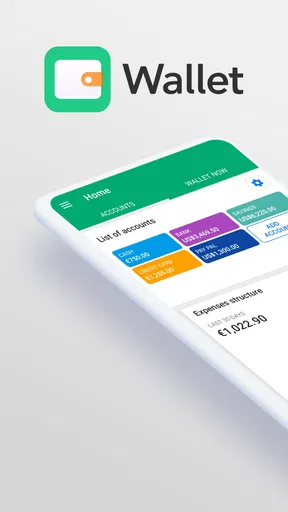
The first thing I noticed was the sleek and clean interface. It’s super intuitive, which is a big win. I’m not a fan of clunky, overly complicated apps, especially when it comes to managing money. Everything is laid out in a way that just makes sense — you’ve got your dashboard, your transactions, your budgets, and your reports all within easy reach.
One feature I absolutely love is the ability to customize categories. You can tweak them to your heart’s content, which means if you’re someone who spends a little too much on late-night snacks or spontaneous online shopping sprees, you can track that with precision.
Features That Stand Out
Now, let’s talk features. One of my favorites is the automatic syncing of transactions. Once you connect your bank accounts, the app automatically pulls in your transactions and categorizes them. I didn’t have to lift a finger. It’s like magic, but for your finances.
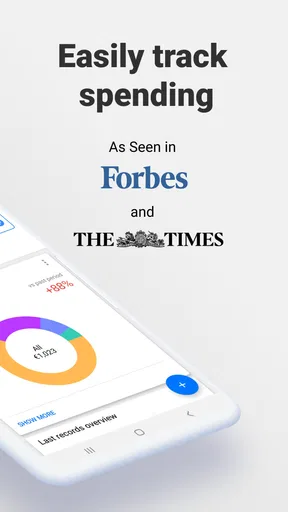
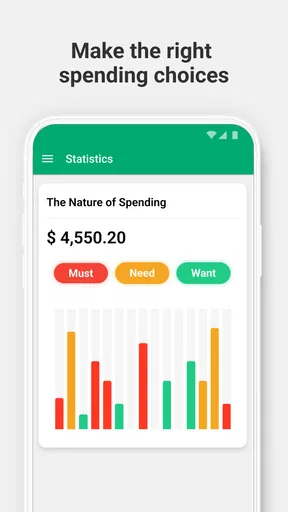
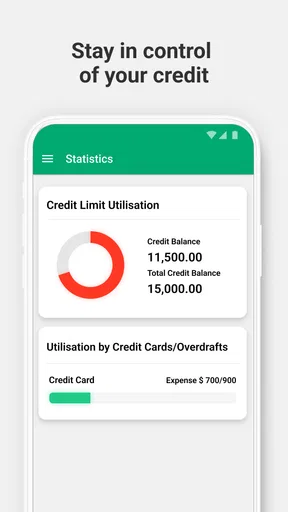
The app also provides insightful reports and graphs that break down your spending habits. It’s eye-opening, to say the least. You can see exactly where your money is going and make adjustments as needed. I found myself rethinking a few spending habits after seeing my first report.
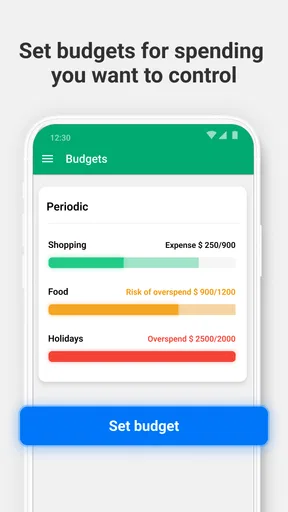
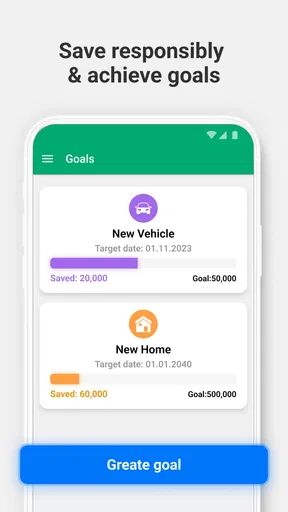
Another cool feature is the ability to set financial goals. Whether it’s saving up for a vacation or paying off debt, you can set goals and track your progress right within the app. It feels pretty empowering watching that little progress bar move closer to your goal.
Security and Privacy
Security is always a top concern when dealing with financial apps, and I’m happy to report that the developers have taken this seriously. The app uses bank-level security and data encryption, so you can rest easy knowing your information is safe.
For those who are wary of connecting their bank accounts, there’s also the option to manually enter transactions. It’s a bit more work, but it’s nice to have the option.
Final Thoughts
So, here’s the bottom line: if you’re looking for a way to get a better handle on your finances, Wallet: Budget Expense Tracker is a solid choice. It’s user-friendly, packed with features, and offers a level of convenience that’s hard to beat. Whether you’re a budgeting newbie or a seasoned pro, this app has something to offer.
Give it a try, and you might find, like I did, that managing your money doesn’t have to be a chore. Instead, it can be an empowering journey towards financial freedom. And honestly, who doesn’t want that?
A realistic routine that makes the reports useful
Imagine payday arrives and I set aside money for rent, utilities and groceries, while leaving a defined amount for meals out and other flexible spending. A few days later, I check Wallet before agreeing to another dinner plan. The point is not to let an app make the decision for me; it is to see whether the month’s discretionary spending is already running ahead of my plan. That is a modest, realistic use of a budget, and it gives the reports a purpose beyond browsing charts.
For a more reliable view, I would make the categories match the choices I actually want to make. If takeout and groceries are combined but I’m trying to reduce restaurant spending, the broad total may hide the useful distinction. Conversely, making a separate category for every tiny purchase creates busywork and can make the summary harder to scan. I’d start with a few meaningful groups, then refine them only when a report raises a question I genuinely want to answer.
Small habits that prevent misleading totals
Even when syncing is enabled, I’d set aside a short review session rather than treating automatic categorization as final. A quick pass can catch a transaction assigned to the wrong category and help me notice an unusual charge before it distorts the month’s picture. This is especially helpful around shared expenses, refunds or purchases that could reasonably fit more than one category. The app can organize information, but I still need to decide what the numbers mean for my household.
For manual tracking, I would record a purchase close to when it happens instead of trying to reconstruct a week from memory. Small cash purchases are easy to forget, and missing entries can make a budget look healthier than it is. If I know I will not keep up with manual logging, connecting an account may be the more practical route where supported; if I prefer not to link one, I should accept that the result depends on my own consistency.
There is also a useful distinction between a budget and a goal. A budget helps me set limits for spending areas; a goal gives a particular purpose to money I want to build toward, such as a trip or debt repayment. Keeping those intentions separate can make the dashboard easier to interpret: one view helps manage this month, while the other reminds me why I am making a trade-off. I would avoid setting too many targets at once, since a long list of progress bars can become another thing to manage rather than a source of motivation.
Choosing it over familiar alternatives
Compared with a bank’s own app, Wallet is attractive when I want a broader budgeting routine rather than a quick balance check. A bank app may be the better choice if I only need account-specific information or want to avoid maintaining a second place to review transactions. Wallet’s appeal is the combination of spending categories, budgets, reports and goals, but the practical benefit depends on whether seeing those pieces together changes what I do.
Compared with a spreadsheet, the app offers a more ready-made way to review transactions and spending, while a spreadsheet can be shaped around unusual household rules or calculations. I would choose the spreadsheet if I enjoy building a precise system and do not mind entering or reconciling information. I’d choose Wallet if I prefer a guided, mobile-first routine and want to spend less time designing the tracking method itself. Neither choice is automatically more accurate: the quality of either one rests on complete, sensible records.
A notes app or a simple list may be enough for someone who only wants to jot down a few upcoming bills. Wallet makes more sense when those reminders need to sit alongside a broader view of spending and goals. For a person who wants investment research, tax preparation or financial coaching, I would look for a tool designed for that specific work instead of expecting an expense tracker to cover it. Its strengths are clearest when the task is ordinary personal budgeting.
Questions worth settling before relying on it
One question I would ask before connecting an account is whether my particular bank connection is available and behaves reliably for the account I plan to track. Support can vary, so I would test the connection with a small, low-stakes routine before depending on it to monitor every bill. If it proves inconvenient, manual entry remains an option, but I would be honest with myself about whether I will keep that up.
I would also decide how I want to handle shared household spending. If another person pays some bills or uses a separate account, a single person’s transaction feed may not tell the whole story. Agreeing on which expenses to record, and whether to enter shared costs manually, can prevent the budget from giving a misleading impression. The app can help organize the records I choose to keep; it cannot resolve differences in how household members define a fair budget.
Finally, I would not assume that every useful feature is included in the free experience. The app can be tried without an upfront purchase, but its in-app purchases have a wide price range, so I would check the exact feature and cost shown before buying. If the basic workflow already helps me review spending, I may not need to pay for anything. If a paid option is essential to my intended setup, I would compare that cost with the time it saves and with simpler alternatives before committing.
My buy-or-skip verdict
I would start with Wallet if I wanted categories, budgets, reports and goals in one mobile routine, and I was prepared to review the results rather than trust every label automatically. The free starting point makes trying that routine reasonable, while the optional purchases are a reason to inspect the details before paying. Its best value is practical: it can make patterns easier to notice and give a budget enough visibility to guide everyday choices.
I would skip it if I only needed a fast bank balance, disliked reviewing transactions, or wanted a specialist tool for investing or tax work. I’d also choose a spreadsheet if I needed a highly tailored system and was happy to maintain it. For everyone else, my advice is to begin with one budget question, use a few clear categories, and see whether Wallet helps you make a real decision. If it does, it has earned a place in your routine; if not, a simpler method may serve you better.
Verdict
Strengths of Wallet: Budget Expense Tracker
- User-friendly interface, easy navigation.
- Customizable budget categories.
- Real-time expense tracking.
- Syncs across multiple devices.
- Secure data encryption.
Limitations of Wallet: Budget Expense Tracker
- Limited free features.
- Ads can be intrusive.
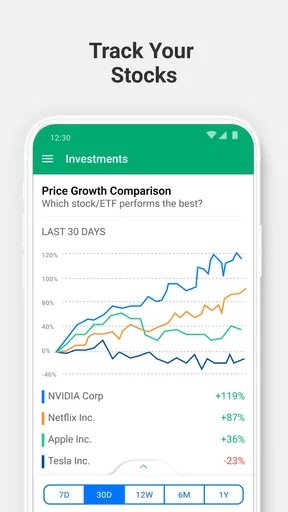
- No investment tracking.
- Requires continuous internet.
- Occasional sync delays.
Similar Picks in This Category
View All
Google Wallet
Google LLC4.3

Airtel: Recharge, Bank & Loans
Airtel4.0

PayPal - Pay, Send, Save
PayPal Mobile4.2

DANA Indonesia Digital Wallet
PT Espay Debit Indonesia Koe4.5

Binance: Buy Bitcoin & Crypto
Binance Inc.4.8

Cash App
Block, Inc.4.7
Frequently Asked Questions
What features does Wallet: Budget Expense Tracker offer?
Wallet: Budget Expense Tracker provides a comprehensive set of tools for managing personal finances. It includes features such as budgeting, expense tracking, bank synchronization, and detailed financial reports. Users can set financial goals, manage shared budgets with family or friends, and receive insights into their spending habits to make informed financial decisions.
Is my financial data safe with Wallet?
Yes, Wallet: Budget Expense Tracker prioritizes user data security. The app employs advanced encryption protocols to protect sensitive information. Additionally, bank synchronization is handled securely, ensuring that your financial data remains private and protected against unauthorized access. Regular updates also enhance security features.
Can I use Wallet without syncing my bank accounts?
Absolutely. While bank synchronization is a key feature for real-time tracking, Wallet allows users to manually input transactions if they prefer not to link their bank accounts. This flexibility lets users maintain control over their data and still benefit from the app’s budgeting and expense tracking features.
Does Wallet support multiple currencies?
Yes, Wallet: Budget Expense Tracker supports multiple currencies, making it ideal for users who travel frequently or manage finances in different countries. You can switch between currencies within the app, and it will automatically convert values based on the latest exchange rates, ensuring accurate financial management.
Is Wallet suitable for managing shared budgets?
Wallet excels at managing shared budgets, which is perfect for families or groups. The app enables users to create joint accounts, allowing multiple people to contribute to and monitor shared financial goals. This feature promotes transparency and collaborative financial planning, making it easier to manage group expenses.
